What you'll learn
- Paths for greenfield Vitest + RTL, critical E2E, Jest migration and coverage with judgment
- Match smells like brittle tests or over-mocking to a fix
- Pyramid: many fast unit/integration tests, few Playwright E2E paths
- What to test in React apps, and what to leave alone
Automated tests are code that checks other code behaves as expected. In React apps, the 2026 default stack is Vitest (opens in a new tab) plus React Testing Library (opens in a new tab) for unit and integration tests, and Playwright (opens in a new tab) for a small set of critical end-to-end paths. Jest remains a solid migration path if you already have a green suite.
Use the strategy picker when you know your situation. Use the smell matcher when the suite already hurts. For accessible names that make role queries easier, see Accessibility & Semantics. For CI gates, see Project Standards.
How to use this page
- Pick a strategy path if you are starting or migrating.
- Match a smell if the suite is brittle, flaky or theatrical.
- Prefer Vitest + Testing Library; keep Playwright for money paths.
- Test what users notice, not implementation details.
Pick a test strategy
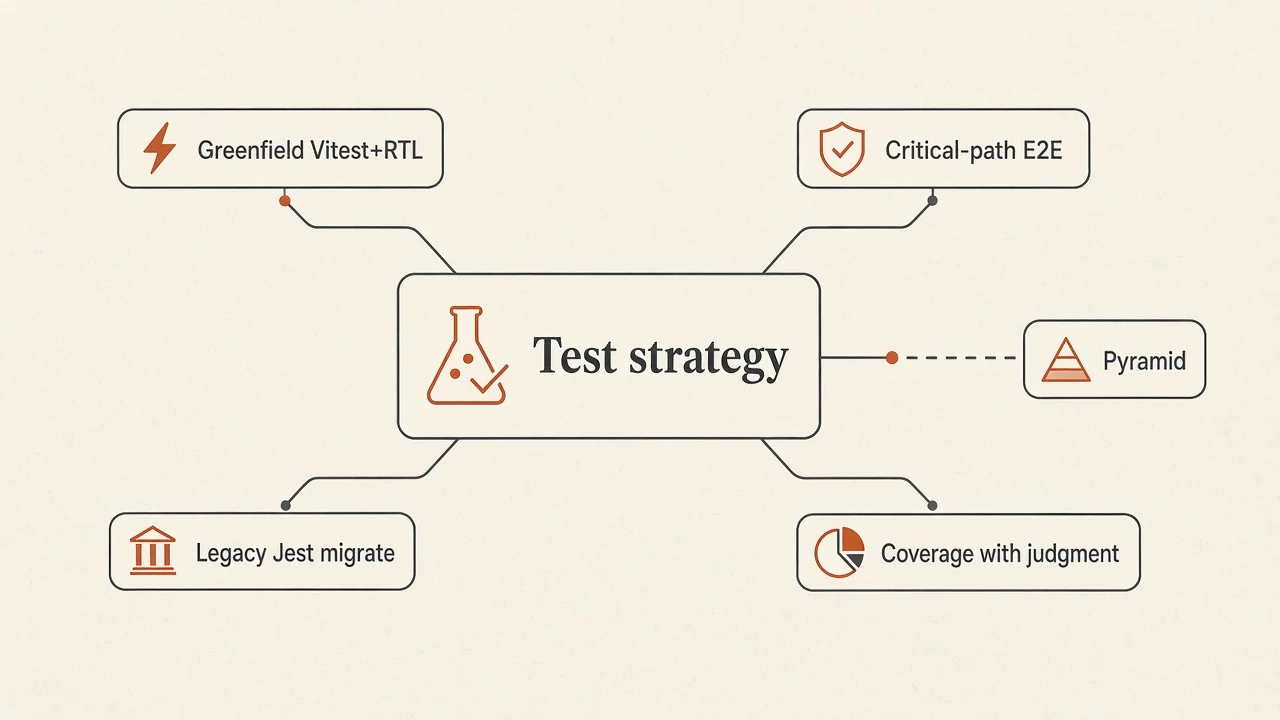
Try it: test strategy
Pick your situation. You get an ordered approach, why it fits, and a first-week plan.
Goal
Your path
Vitest plus Testing Library is the 2026 default
Vite-native unit and integration tests with queries that match how users find UI beat Enzyme-style implementation checks.
- Vitest
Runner for unit and integration tests.
- React Testing Library
Query by role and text, not internals.
- MSW
Mock HTTP at the network boundary.
- Guiding Principles (Testing Library)
Testing Library guiding principles.
First week
Add Vitest and Testing Library. Write three tests: one pure util, one component with userEvent, one page with MSW.
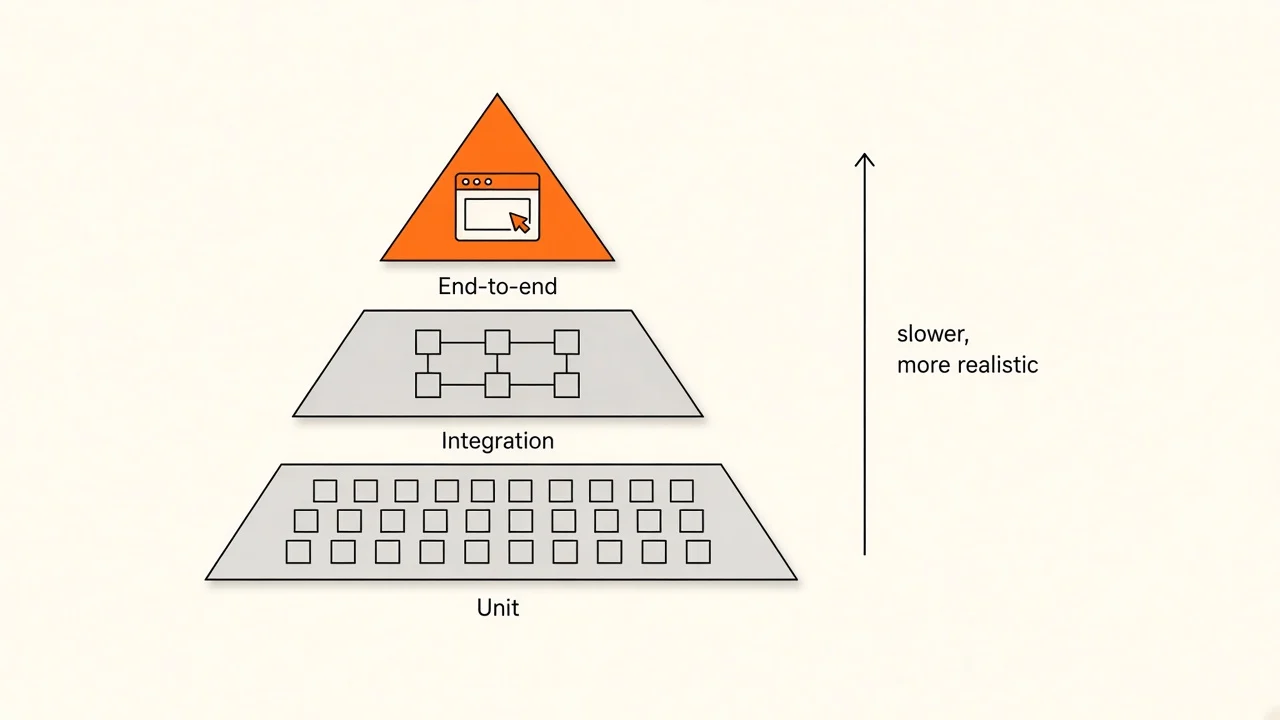
Tip: many fast tests near the base of the pyramid, few slow E2E tests at the tip.
Checkpoint
You are starting a new Vite React app. What is the best default unit and integration runner?
Pick an answer, or press A, B, C on your keyboard.
Match a test smell
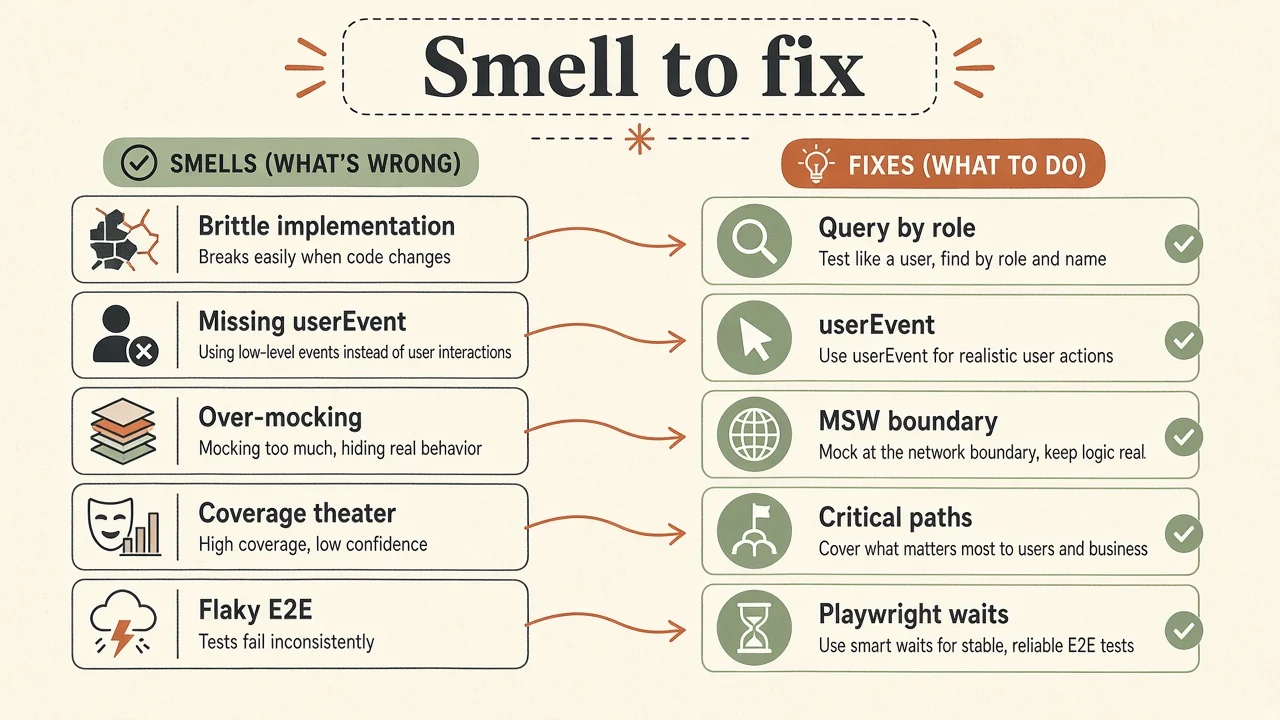
Try it: match a test smell
Choose the smell you see in the suite. The matcher points to a primary fix.
Smell
The smell
Tests break when you rename a prop or reorder DOM that users never notice.
Start here
Guiding Principles (Testing Library)Query the way users find UI: roles, labels and text. Avoid enzyme-style .find() and prop peeking.
Tip: if a refactor of behavior-preserving code breaks a test, the test was probably too brittle.
Key takeaway
If a behavior-preserving refactor breaks a test, the test was probably too brittle.
Why automated testing
Split the argument if you need buy-in from non-technical stakeholders.
- Efficiency: repetitive cases run without a human clicking every time.
- Consistency: the same steps run the same way.
- Regression safety: changes get a fast signal before production.
- Documentation: good tests show how a feature is meant to behave.
- Earlier detection: bugs cost less when found in CI than in production.
- Less manual regression time for the same coverage of critical paths.
- Faster release cycles with fewer surprise breakages.
- Risk reduction on checkout, auth and other money paths.
- Higher baseline quality when tests cover what users notice.
The three types of tests
- Unit - smallest pieces (utils, pure components) behave as expected.
- Integration - several units work together (page + form + mocked API).
- End-to-end (E2E) - a real browser walks a full user path.
- Test runner - discovers and runs test files (Vitest, Jest, Playwright).
- Assertion - a check that something is true (for example, a button is enabled).
- Mock - a stand-in for something hard to control (HTTP,
window.scrollTo). - Coverage - how much code ran during tests. A signal, not a scoreboard.
- Regression - a previously working behavior broke after a change.
Getting started (Vitest + RTL)
- Unit and integration runner: prefer Vitest (opens in a new tab). Keep Jest (opens in a new tab) if the suite is already green and migration is not urgent.
- Component queries: React Testing Library (opens in a new tab). Do not start new suites on Enzyme. Its APIs push tests toward internals.
- HTTP mocks: MSW (opens in a new tab) at the network boundary.
- E2E: Playwright (opens in a new tab) by default. Cypress (opens in a new tab) is fine if the team already lives there.
- Watch a short walkthrough if you have never written a React unit test, then rewrite the example against Vitest + Testing Library patterns.
# typical Vite + Vitest install shape (check current Vitest docs for flags)
npm install -D vitest @testing-library/react @testing-library/jest-dom @testing-library/user-event jsdomimport { render, screen } from '@testing-library/react'
import userEvent from '@testing-library/user-event'
import { expect, test } from 'vitest'
import { Counter } from './Counter'
test('increments when the user clicks', async () => {
const user = userEvent.setup()
render(<Counter />)
await user.click(screen.getByRole('button', { name: /increment/i }))
expect(screen.getByText('1')).toBeInTheDocument()
})Checkpoint
Which question best decides whether something belongs in a test?
Pick an answer, or press A, B, C on your keyboard.
What to test in a React app
Most of what you control falls into visual checks and behavioral checks. Prefer behavior.
- Snapshot testing - cheap signal that DOM changed; often noisy.
- Visual regression - screenshot comparison when layout truly matters.
- Styles - usually a weak ROI unless style is the feature (for example, a critical empty state).
- UI components and utils (unit)
- Custom hooks via a consuming component (unit/integration)
- Stores with the library's recommended testing approach (unit)
- Page and feature components with MSW (integration)
- Money paths in a real browser (E2E)
- UI components: pass props, assert render states (loading, empty, error). Prefer
userEventfor clicks and typing. For controlled components, assert callbacks fire with expected arguments. - Hooks and context: consume them in a real or dummy component. Isolating a hook without a consumer is usually harder and less realistic.
- Global stores: follow the library docs (for example Redux or Jotai testing guides).
- Utils: pure functions are the easiest wins. Input in, output out.
- Pages and features: test forms, validation, navigation and error states with MSW returning success and failure.
- E2E: multi-step auth, checkout and other paths where breakage is expensive. Cover happy and sad paths.
Identifying what to test:
- Which breakages would be really bad? Start integration and E2E there.
- Acceptance criteria on a ticket are ready-made test ideas.
- Whatever you manually click while building is a candidate for automation.
- When in doubt: would the user notice?
What to avoid:
- Asserting child components were called with certain props
- Ordering assumptions like "the second
.buttonin the DOM" - Peeking at internal state (carousel index) instead of visible output
- Enzyme-style
.find()/.props()chains on implementation details
FAQs
Tips
- A true refactor should not break behavior tests. If it does, the test likely encoded implementation detail.
- Use a custom render (opens in a new tab) with your providers.
- Prefer userEvent (opens in a new tab) over
fireEventin almost all cases. - Use MSW (opens in a new tab) for APIs and faker (opens in a new tab) when you need bulk fake data.
- Query by role, label and text. The Testing Playground (opens in a new tab) and browser Accessibility Computed Properties help.
// Mock browser APIs you do not import
beforeAll(() => {
  window.scrollTo = vi.fn()
})

beforeEach(() => {
  vi.mocked(window.scrollTo).mockClear()
})

// Module mocks when MSW is not the right tool
import { someFunction } from 'third-party-npm-dependency'

vi.mock('third-party-npm-dependency')

test('uses a mock implementation', () => {
  vi.mocked(someFunction).mockImplementation(() => {})
})
Watch Testing Library: everybody uses it, but nobody understands it (opens in a new tab) by Matan Borenkraout for query depth.
Testing checklist
- New apps use Vitest + React Testing Library by default
- Enzyme is not on the recommended path
- Critical money paths have Playwright (or existing Cypress) coverage
- HTTP is mocked at the boundary (MSW), not by mocking every module
- Queries prefer role, label and text over DOM structure
- Coverage goals do not replace critical-path tests
- CI runs the fast suite on every PR; E2E on the right jobs
Further reading
- What is a test? (opens in a new tab) by Kent C. Dodds
- Testing Implementation Details (opens in a new tab) by Kent C. Dodds
- Fix the "Not Wrapped in act() Warning" (opens in a new tab) by Kent C. Dodds
- Testing Library guiding principles (opens in a new tab)
- Project Standards
- Maintainable React Architecture
- Accessibility & Semantics
- Ecosystem
- Frameworks & Build Tools
- Books & Reading
Conclusion
Ship confidence, not theater. Vitest and Testing Library cover most React UI behavior. Playwright protects the few paths that must not break. Drop Enzyme habits, mock at the edges and ask whether a user would notice.
The key takeaway
Default to Vitest + React Testing Library, reserve Playwright for critical paths and treat coverage as a signal rather than a trophy.
Check your understanding
What is the recommended default for unit and integration tests in a new Vite React app?
Pick an answer, or press A, B, C on your keyboard.
Decision framework
| Goal | Prefer |
|---|---|
| New React app | Vitest + React Testing Library |
| Money-path confidence | A few Playwright flows |
| Legacy Jest suite | Keep green; migrate package by package |
| Coverage vanity | Drop; cover critical user paths instead |
When not to add E2E
- The bug is a pure function or a single component contract
- The suite is already slow and flaky: fix smells first
Checklist
- Tests assert user-visible behavior
- Network mocked at the boundary (for example MSW)
- Playwright reserved for critical paths
Recap
What to remember from this article
Sections read
0
Questions
0
none answered yet
Quiz
0
not taken yet
Up next: Next.js SEO Checklist · 2 min
Continue