What you'll learn
- Paths for greenfield features, god-component extraction, API churn and feature folders
- Match smells like fetch-in-UI or API fields in JSX to a fix
- Four boundaries: UI, state, services and converters
- Feature-first folders, dependency direction and incremental refactor
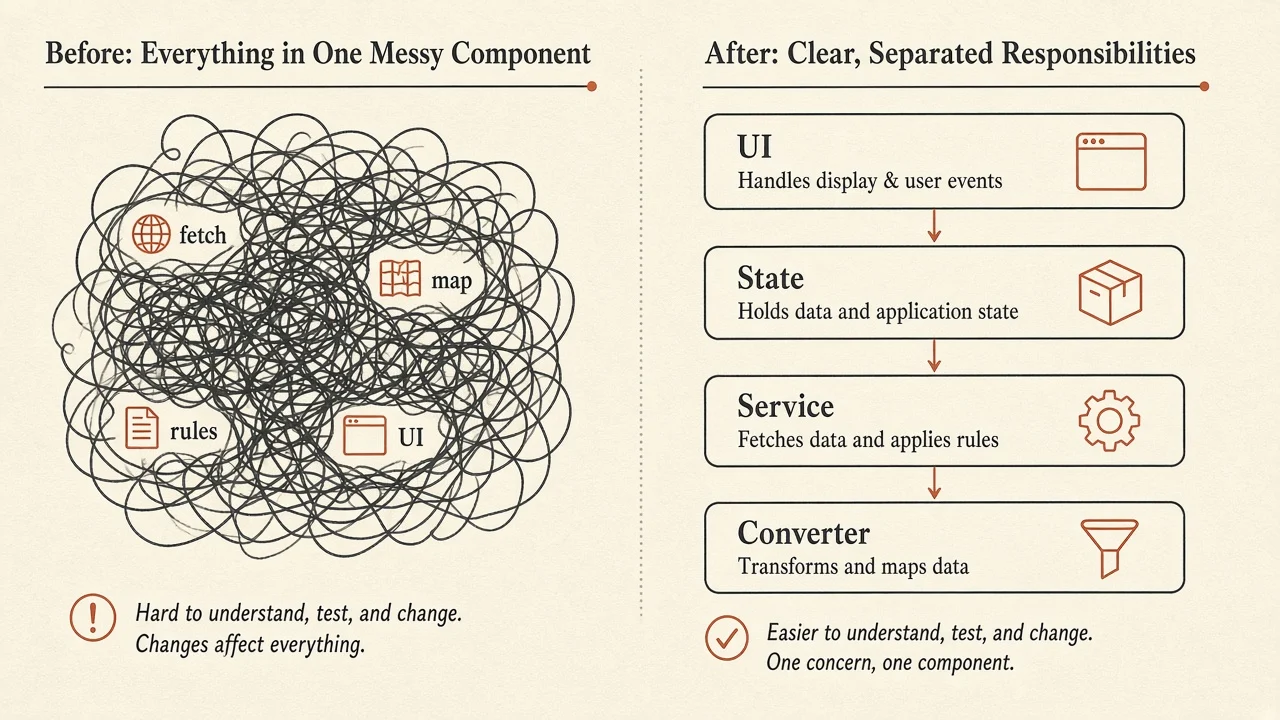
React apps rarely fail because someone forgot a folder. They get hard to change when one component owns fetch, mapping, business rules and rendering at once. Clear boundaries between UI, state, services and converters make changes safer and tests narrower.
This page is about responsibility boundaries inside a feature. For folder growth, naming and lint-enforced import layers, use Project Standards. For how to test each layer, see Automated Testing. For server-state tools, see State Management.
How to use this page
- Pick an architecture path if you know your situation.
- Match a smell if the code already hurts.
- Keep UI free of HTTP and API field names.
- Migrate one feature at a time; do not rewrite the world.
Pick an architecture path
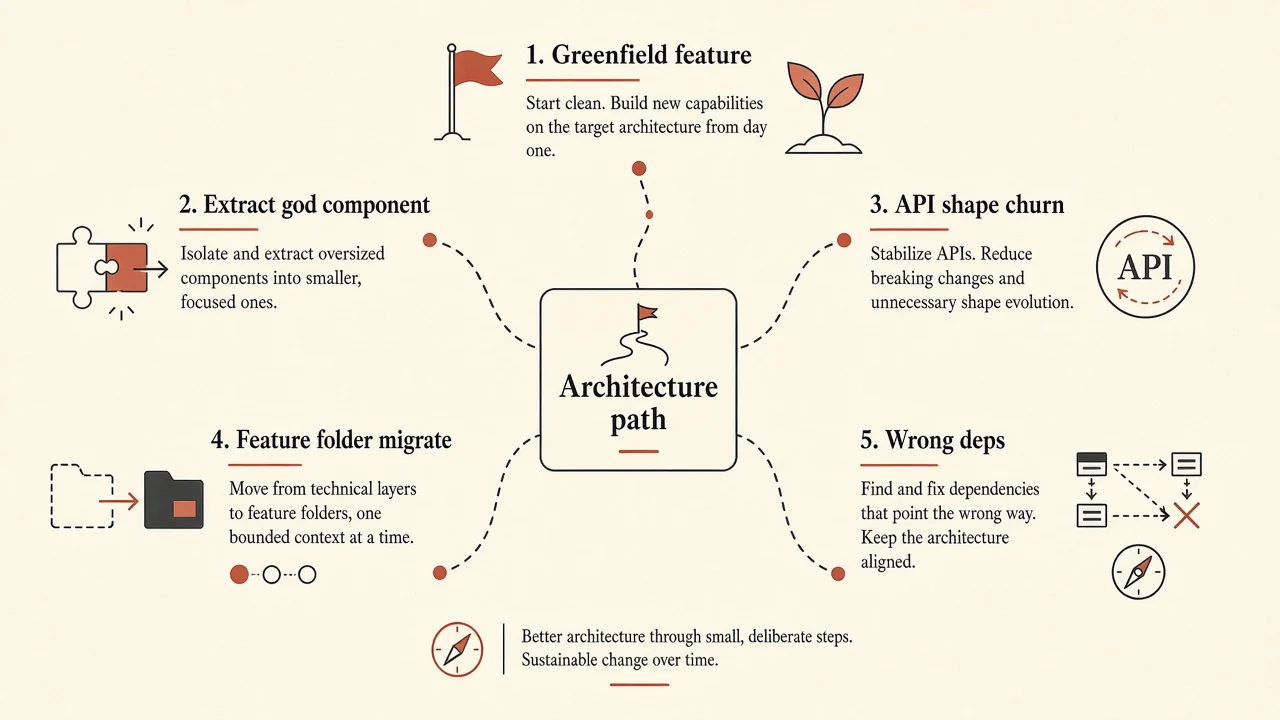
Try it: architecture path
Pick your situation. You get an ordered approach, why it fits, and a first-week plan.
Goal
Your path
Draw four boundaries before the page fattens
A new feature is cheap to structure well. UI, state, service and converter stay small when you invent them early.
- Feature folders
Colocate the feature before it spreads.
- Service layer
One place for HTTP and external calls.
- Converter layer
Map API shapes to app models once.
- UI layer
Presentational components take props only.
First week
Create a feature folder with page, list component, useX hook, service and toModel converter. Keep fetch out of the list.
Tip: boundaries beat folder counts. Extract what changes for different reasons.
Checkpoint
You have a page that fetches, maps status codes and renders a list. What is the safest first extract?
Pick an answer, or press A, B, C on your keyboard.
Match an architecture smell
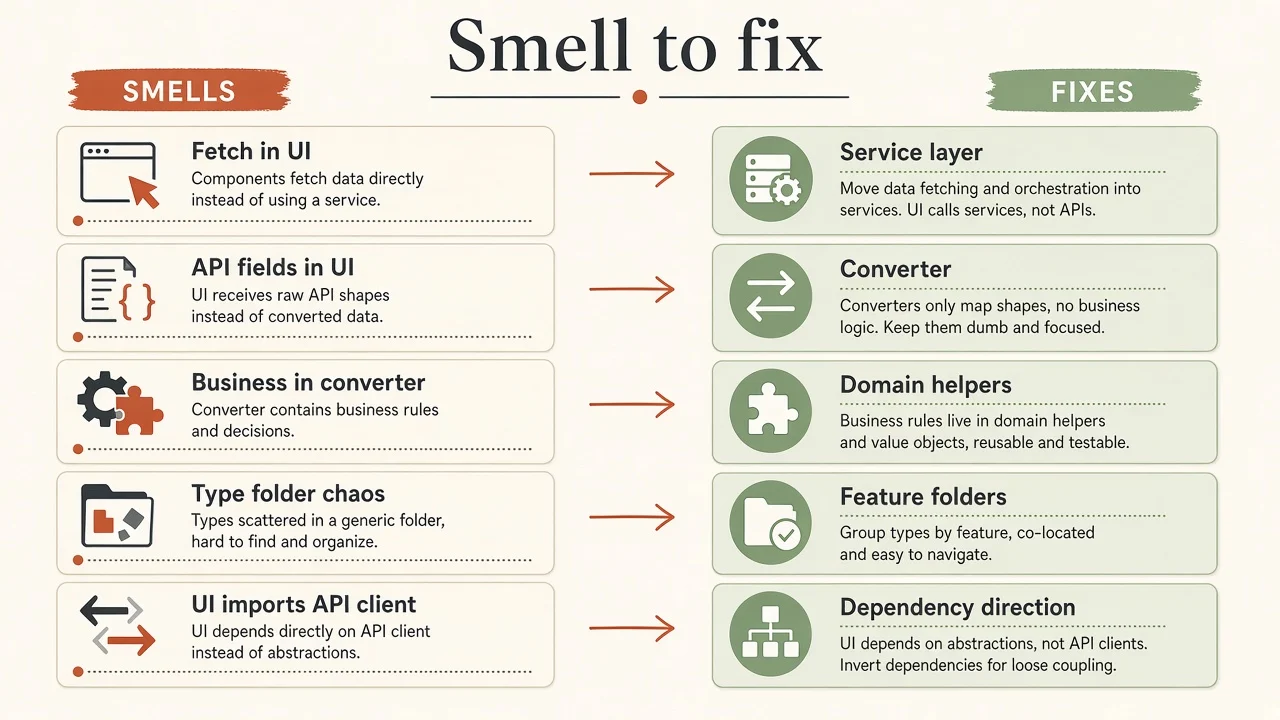
Try it: match an architecture smell
Choose the smell you see in the codebase. The matcher points to a primary fix.
Smell
The smell
Components call fetch or axios inside useEffect and own loading plus mapping.
Tip: if a presentational component needs the network, the boundary is already wrong.
Key takeaway
Coupling is the real problem: multiple responsibilities change for different reasons but live in one place.
The problem is coupling
Most React apps start simply: fetch in a page, store in state, render the result. That is fine for a small feature.
Pain shows up when the same component also transforms API responses, applies business rules, owns loading and error UI, and gets copied into a second page. A change to the backend then forces edits in a file that also owns layout.
function UsersPage() {
  const [users, setUsers] = useState([])
  const [loading, setLoading] = useState(false)

  useEffect(() => {
    setLoading(true)
    fetch('/api/users')
      .then((response) => response.json())
      .then((data) => {
        setUsers(
          data.map((user) => ({
            id: user.user_id,
            name: user.full_name,
            isActive: user.status === 1,
          }))
        )
      })
      .finally(() => setLoading(false))
  }, [])

  return (
    <div>
      {loading ? (
        <p>Loading...</p>
      ) : (
        users.map((user) => (
          <div key={user.id}>
            {user.name}
            {user.isActive && <span>Active</span>}
          </div>
        ))
      )}
    </div>
  )
}Nothing here is evil for a prototype. The pattern becomes expensive when it spreads: API changes, shared user data on another route, or a test that needs the mapping without mounting the page.
Four boundaries
For a typical data-driven feature, four boundaries earn their keep:
| Boundary | Responsibility |
|---|---|
| UI | What the user sees and interacts with |
| State | Coordination of data, loading, errors and interactions |
| Services | Communication with APIs and other externals |
| Converters | Mapping between external formats and app models |
The goal is not more files for their own sake. The goal is that a change has an obvious home.
The UI layer
Pages and presentational components display information and handle interaction. They should not know HTTP details, backend field names or auth header setup.
type User = {
  id: string
  name: string
  isActive: boolean
}

type UsersListProps = {
  users: User[]
  loading: boolean
}

function UsersList({ users, loading }: UsersListProps) {
  if (loading) {
    return <p>Loading users...</p>
  }

  return (
    <ul>
      {users.map((user) => (
        <li key={user.id}>
          {user.name}
          {user.isActive && <span>Active</span>}
        </li>
      ))}
    </ul>
  )
}This component does not know the endpoint, how "active" is encoded on the wire, or how auth works. You can test loading, empty and populated states without a network.
Presentation decisions (badge vs text, label copy) still belong here. Business rules and infrastructure do not.
The State layer
State gets messy when fetch, transform and UI updates all live in the page. A feature hook (or server-state library) coordinates those concerns and exposes a small interface.
function useUsers() {
  const query = useQuery({
    queryKey: ['users'],
    queryFn: userService.getUsers,
  })

  return {
    users: query.data ?? [],
    loading: query.isPending,
    error: query.error,
  }
}

function UsersPage() {
  const { users, loading, error } = useUsers()

  if (error) {
    return <p>Unable to load users.</p>
  }

  return <UsersList users={users} loading={loading} />
}
Not every useState belongs in a global store. Local input, modal open state and ephemeral UI often stay in the component that uses them. Put state where it creates the least unnecessary coupling. Deeper tool choice: State Management.
State ownership
State management is about ownership and coordination, not moving every useState into a folder.
The Service layer
Services name operations the app needs from the outside world.
export const userService = {
  async getUsers() {
    const response = await apiClient.get('/users')
    return response.data
  },

  async getUserById(id: string) {
    const response = await apiClient.get(`/users/${id}`)
    return response.data
  },
}
The state layer calls userService.getUsers() instead of knowing URLs, client config or header details. Base URL changes, auth headers and HTTP client swaps stay near infrastructure.
A service is not a dumping ground for every rule. Eligibility and other domain decisions are not the same as "GET /users".
The Converter layer
APIs often speak database or legacy shapes. The UI needs an application model.
{
  "user_id": "u-101",
  "full_name": "Sarah Ahmed",
  "status": 1,
  "created_at": "2026-09-10T08:30:00Z"
}type UserApiResponse = {
user_id: string
full_name: string
status: number
created_at: string
}
type User = {
id: string
name: string
isActive: boolean
createdAt: Date
}
function toUser(apiUser: UserApiResponse): User {
return {
id: apiUser.user_id,
name: apiUser.full_name,
isActive: apiUser.status === 1,
createdAt: new Date(apiUser.created_at),
}
}
export const userService = {
async getUsers(): Promise<User[]> {
const response = await apiClient.get<UserApiResponse[]>('/users')
return response.data.map(toUser)
},
}Converters also help for form values to request payloads and for export formats. They transform data; they should not silently own pricing or permission rules.
Checkpoint
Where should user.status === 1 become isActive: true?
Pick an answer, or press A, B, C on your keyboard.
Connect the layers
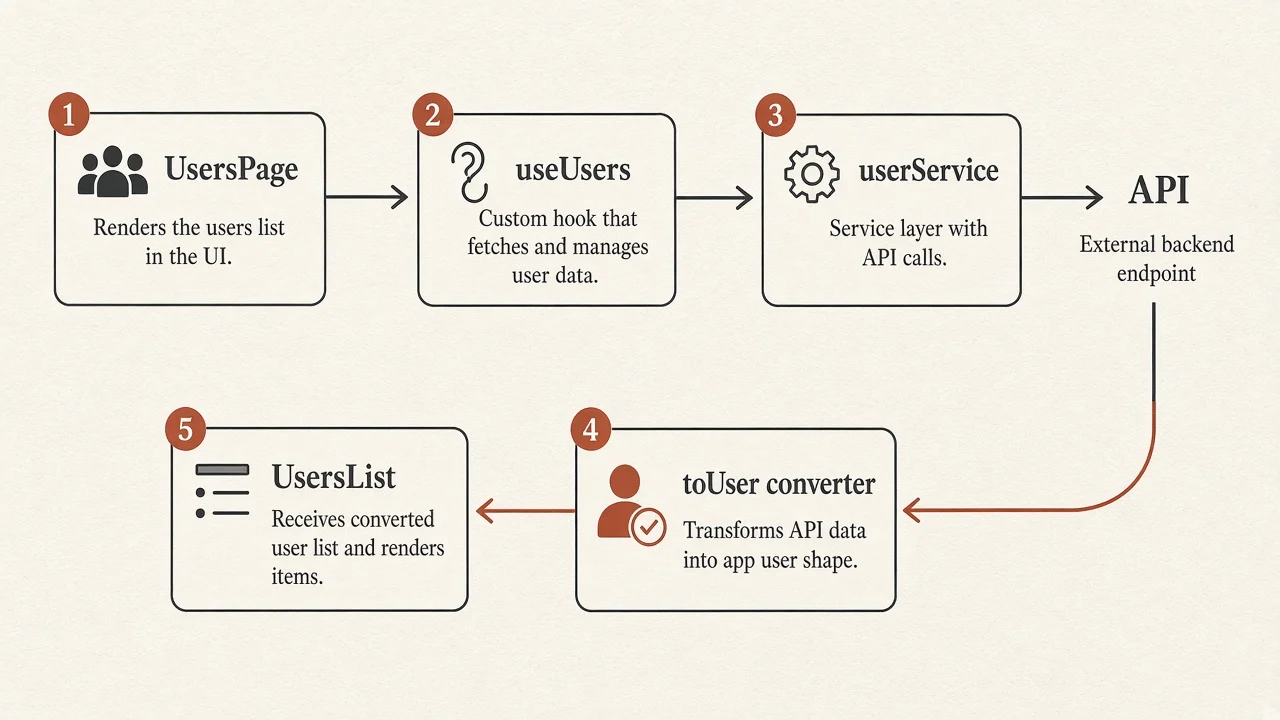
Typical request path: page → feature hook → service → API client → backend. Response path: backend → client → service → converter → app model → hook → page → presentational list.
The UI does not know how the request is made. The service does not know how a row looks. The converter does not know which route renders the result.
Organize by feature
Type-only folders (components/, hooks/, services/) work briefly, then scatter one feature across the tree. Prefer feature first, responsibility second:
src/
  features/
    users/
      components/
      hooks/
      services/
      converters/
      models/
      pages/
  shared/
  app/
Small features do not need every folder on day one. Structure should reveal the architecture you have, not force one you do not need. Folder growth and lint boundaries: Project Standards. Multi-app sharing: Nx Introduction & Architecture.
Dependency direction
Separate folders fail if every layer imports every other layer. A reusable card that imports apiClient is coupled to infrastructure and hard to reuse or test.
Healthier flow:
- Pages compose feature UI and hooks
- Hooks coordinate services and state
- Services use clients and converters
- Converters map external data to app models
- Presentational components take props
Large systems may add a domain layer that depends on neither React nor HTTP. You do not need a full Clean Architecture kit on day one. You do need intentional dependencies.
Testing by layer
Boundaries make tests smaller.
- UI: render
UsersListwith props; no network - Converters: assert
toUsermapping, including dates and status - Services: assert endpoints and parameters (mocked client)
- State: assert loading, success and error coordination
it('converts an API user into an application user', () => {
  const result = toUser({
    user_id: 'u-101',
    full_name: 'Sarah Ahmed',
    status: 1,
    created_at: '2026-09-10T08:30:00Z',
  })

  expect(result).toEqual({
    id: 'u-101',
    name: 'Sarah Ahmed',
    isActive: true,
    createdAt: new Date('2026-09-10T08:30:00Z'),
  })
})
Tooling defaults and smell fixes: Automated Testing.
Incremental refactor
You do not need a rewrite.
- Find a feature that fetches, maps, rules and renders in one place.
- Extract conversion into a dedicated function or module.
- Move HTTP into a service; keep behavior stable.
- Introduce a feature hook (or server-state query) for coordination.
- Leave the page as composition; push presentation down.
- Agree where new code belongs; add lint boundaries if hope fails.
- Repeat on hot paths. Skip cold code that never changes.
Architecture checklist
- Presentational components do not call the network
- UI does not read snake_case API fields or magic status codes
- Services name operations; pages do not hardcode URLs
- Converters map shapes; they do not own business eligibility
- Related feature code lives together (or has a plan to)
- Dependency arrows point toward stable interfaces
- New work follows the boundaries even if old files lag
Further reading
- Project Standards
- Automated Testing
- State Management
- Nx Introduction & Architecture
- Ecosystem
- Frameworks & Build Tools
Conclusion
Maintainability is how easily people can understand, change and test behavior. UI, state, services and converters give a practical split. Feature folders keep related code discoverable. Dependency direction keeps infrastructure from soaking the tree.
Start where responsibilities are mixed. Extract the boundary that removes real pain. Grow the structure with the product.
The key takeaway
Boundaries beat folder counts. Separate what changes for different reasons, then organize so the team can find it.
Check your understanding
What is the best first move for a greenfield data feature?
Pick an answer, or press A, B, C on your keyboard.
Recap
What to remember from this article
Sections read
0
Questions
0
none answered yet
Quiz
0
not taken yet
Up next: Accessibility & Semantics · 13 min
Continue