What you'll learn
- Starting paths for greenfield, SSR, Redux and server-heavy apps
- Match decisions like prop drilling or fetch-vs-store to an approach
- Categories of state and their local or global nature
- Separating server state from client state, then comparing store models
State management is less about picking a trendy library and more about knowing which data is UI chrome, which is a reflection of the server, and which truly needs to be shared.
This page is the state cluster hub. Use it to pick an approach, then open a focused guide for placement, Context vs stores, or anti-patterns.
Use the path picker when you know your situation. Use the decision matcher when you are stuck between two options. The rest of this guide keeps the deep definitions, comparisons and overlaps.
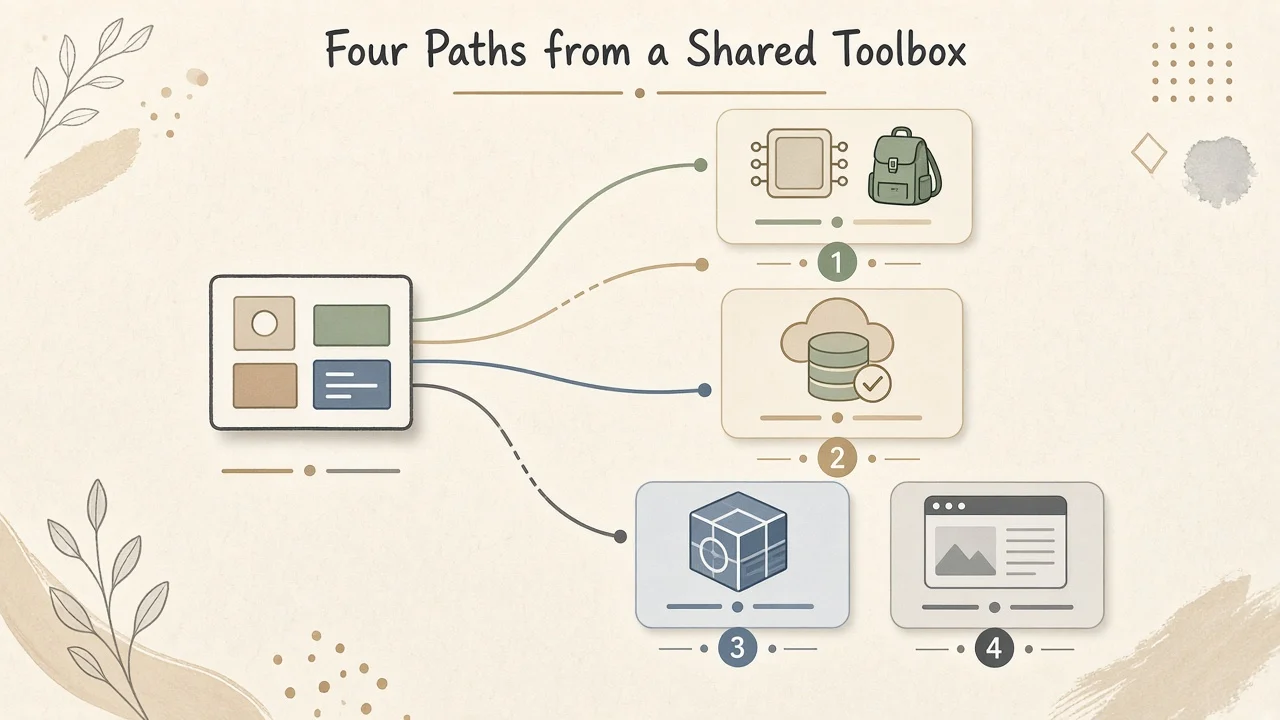
Pick a client state path
Try it: client state path
Pick your situation. You get a short ordered approach, why it fits, and a first-week plan.
Your path
Local first, then fetch, then a small store
Unknown scope is normal at the start. Maximize local state, add a server cache for API data, and introduce a store only when sharing hurts.
- useState
Default for UI and form state.
- TanStack Query
Server state cache for fetches and mutations.
- Zustand
Small global client store if prop drilling appears.
- Proficiency with Hooks
Effect and state patterns that keep local state clean.
First week
Build one screen with useState only. Add TanStack Query for one list endpoint. Do not add Redux yet.
The quick tabs below still show greenfield, Redux and combination notes. The path above is the decision layer.
Checkpoint
You are starting a greenfield SPA with unknown scope. What should you do first?
Pick an answer, or press A, B, C on your keyboard.
Match a state decision
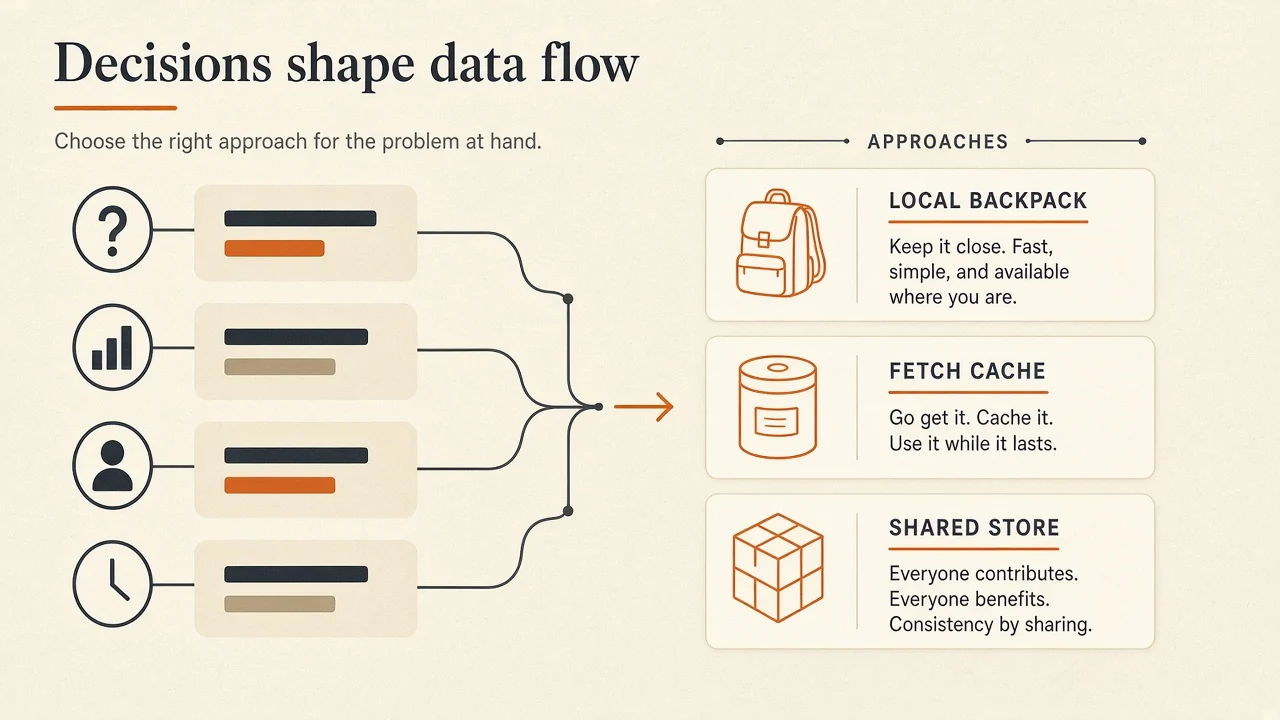
Try it: match a state decision
Choose the decision you are stuck on. The matcher points to a primary approach and an optional alternate.
The decision
The same client value passes through many components that do not care about it.
Related: State management anti-patterns
Overlaps between context, stores and fetch caches are normal. The common overlaps section below goes deeper.
Checkpoint
API list data that can be refetched usually belongs where first?
Pick an answer, or press A, B, C on your keyboard.
Key takeaway
Server data usually belongs in a fetch cache. Ephemeral UI belongs in local state. Global stores earn their place when many distant components share the same client data.
TLDR: Starting Points for Client State Management
- Choose a State Structure (opens in a new tab) for the data you'll manage
- Lift state to a parent (opens in a new tab)
- Lift state to avoid prop-drilling (opens in a new tab)
- Lift state to communicate with sibling components (opens in a new tab)
- Co-locate (opens in a new tab) state near where it is used
- For Data-Fetching choose one of the following
- tanstack-query (opens in a new tab) (REST APIs)
- apollo-client (opens in a new tab) (GraphQL)
- For Global Stores choose one of the following
- Zustand (opens in a new tab) (FLUX)
- Jotai (opens in a new tab) (Atomic)
- For extremely complex state, consider state machines like xState (or the simpler @xState/xStore) (opens in a new tab)
- Choose a State Structure (opens in a new tab) for the data you'll manage
- Lift state to a parent (opens in a new tab)
- Lift state to avoid prop-drilling (opens in a new tab)
- Lift state to communicate with sibling components (opens in a new tab)
- Co-locate (opens in a new tab) state near where it is used
- For Data-Fetching choose one of the following
- tanstack-query (opens in a new tab) (REST APIs)
- apollo-client (opens in a new tab) (GraphQL)
- For Global Stores choose one of the following
- Zustand (opens in a new tab) (FLUX)
- Jotai (opens in a new tab) (Atomic)
- For extremely complex state, consider state machines like xState (or the simpler @xState/xStore) (opens in a new tab)
Does any of this apply to SSR (Next.js / Remix)
In general, this guide applies to managing state on the client (browser). Since the entire premise of SSR is SERVER-side, this guide doesn't really apply to managing any state on the server. To summarize:
- Even apps that use SSR might also need to manage state on the client
- Simple CRUD-like (opens in a new tab) applications often means you can shift/move some of your client state to the server
Term Definitions
Before explaining this approach to State Management, let's get on the same page regarding some phrases frequently used.
A broad term, meaning the information the application manages & requires to function correctly
State data that is managed on the client side of 2 networking applications (browser and server)
State data that is managed server-side (database, APIs, etc.)
the use of the term "local state" in this guide will fluctuate between two concepts:
- State data that is local by how its used - for example, state that is hidden in a React component and not available externally of said component (commonly done with
useState) - State data that is intended for or that obviously should be local (many variations of UI State)
The opposite of local (above), the use of the term "global state" means one of two things:
- State data that is global by configuration (regardless of what the state data is representing or if it ideally would be better as local state). If the data has been configured in a way that it's globally accessible in your React component tree without having to pass as props, then it shall be called "global state"
- State data intended to be global or state data that should obviously be managed globally (trivial examples might be the currently authenticated user, the user-session access token, application theme data like light/dark mode, etc.)
The actual "container" or object that holds the app-state data. A good metaphor might be like a database (in your front end), the source of truth, etc. "State" is a more generic term describing the data you manage, whereas the store is an object/memory/container that actually holds that data your application must manage.
Use of this term refers to the individual tool/solution used to implement some state management logic (whether it be Context, Redux, or react-query)
Categories of State In Web Apps
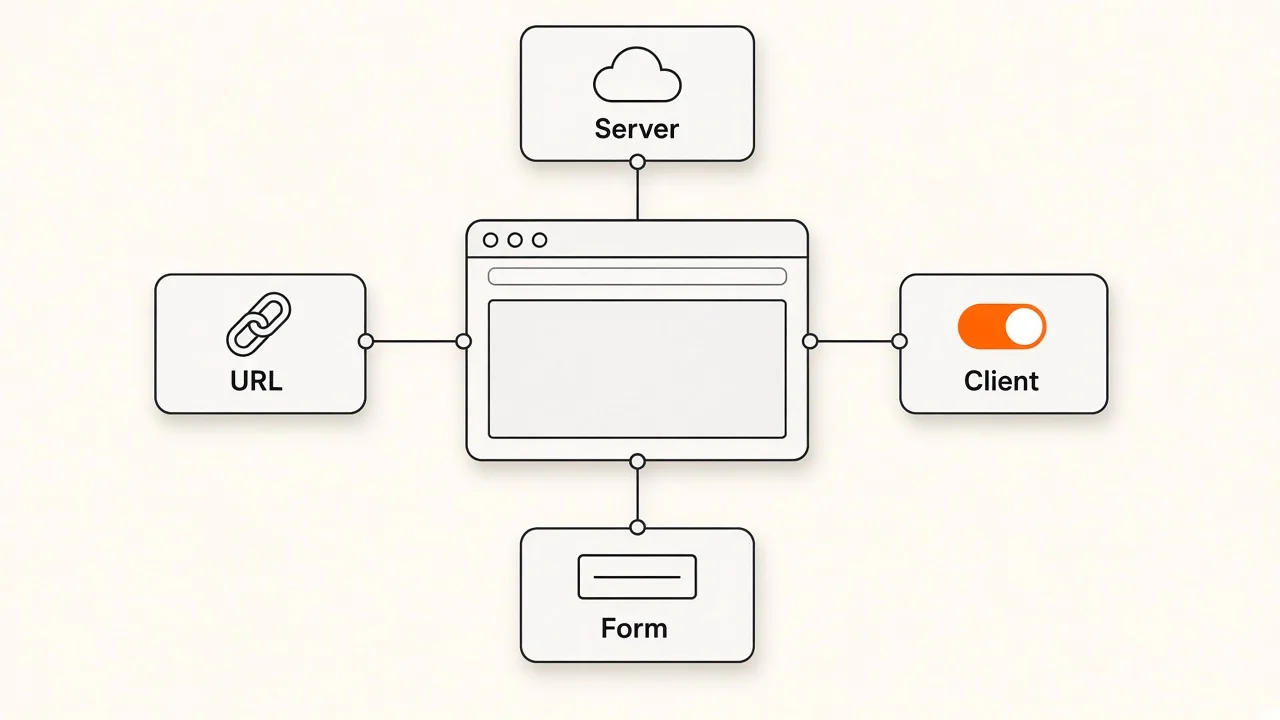
Outlined here are the various categories data your application might need to manage. The distinction matters because some state-management tools fit certain kinds of state better than others.
If you're interested in a more detailed definition of each state category below, you might take the time to read The 5 Types of React Application State (opens in a new tab). Think of these categories as out of your control; this is simply the nature of the web and how the industry has decided to categorize information.
Local state is just what it sounds like: state that doesn't leave your container. "Container" is a pretty generic word, in React-world it is a synonym for "component". Some examples of what is meant by "local state" are form values, toggle states (true/false) representing expanded sidebars, opened accordions, active tabs, etc. One way to think about local state is you can typically discard it until the "container" renders again, initiating the state with a default value. Most of the time, you should use native React hooks (useState, useReducer, useContext) to manage this type of state.
Communication state is less about storing data and more about storing the status of processes. In modern apps, we deal with asynchronous functionality constantly (HTTP requests, background tasks running on server, etc.) We need to keep our app responsive while things are happening in the background. Storing when processes are loading, complete, or have encountered an error is the "communication" state we want. Managing this properly allows us to show loading animations, optimistic UIs, feedback, errors, etc., all leading to a better user experience. It will be up to you to decide how much of your "communication state" needs to live globally in a store vs. locally in containers like pages or components. In many applications this is easily solved with "Smart" data-fetching.
Data state is the easiest to define of all these types. It's any data that powers your application! It's all the data the users need to use the application; it usually comes from external applications (like servers, databases, REST APIs, etc.). This data type can overlap with number 4 below (session state) in small ways. An example might be a user's profile data. That info could probably be considered both "business" data and "session" data - where exactly to draw that line can be blurry, but don't worry about that for now.
Session state is all about managing information about the user currently using your application. It should be noted that even though this is sometimes referred to as "Auth State" - sessions can also exist for unauthenticated users of apps/websites (like an unauthenticated user adding things to their shopping cart on an e-commerce website).
Unless you are building a router or doing some very complex work with browser location APIs - managing the location state of your app will typically be handled natively by the browser or a library like react-router. Commonly, the behavior of your application will rely on the URL (like using an id in a URL such as /invoice?id=1234). However, it is very uncommon for you to need to manage the location state yourself. Typically you would let the browser's native functionality or a solution like react-router manage this state for you. We don't focus on managing that type of state in this guide.
Local or Global: Developers Choice
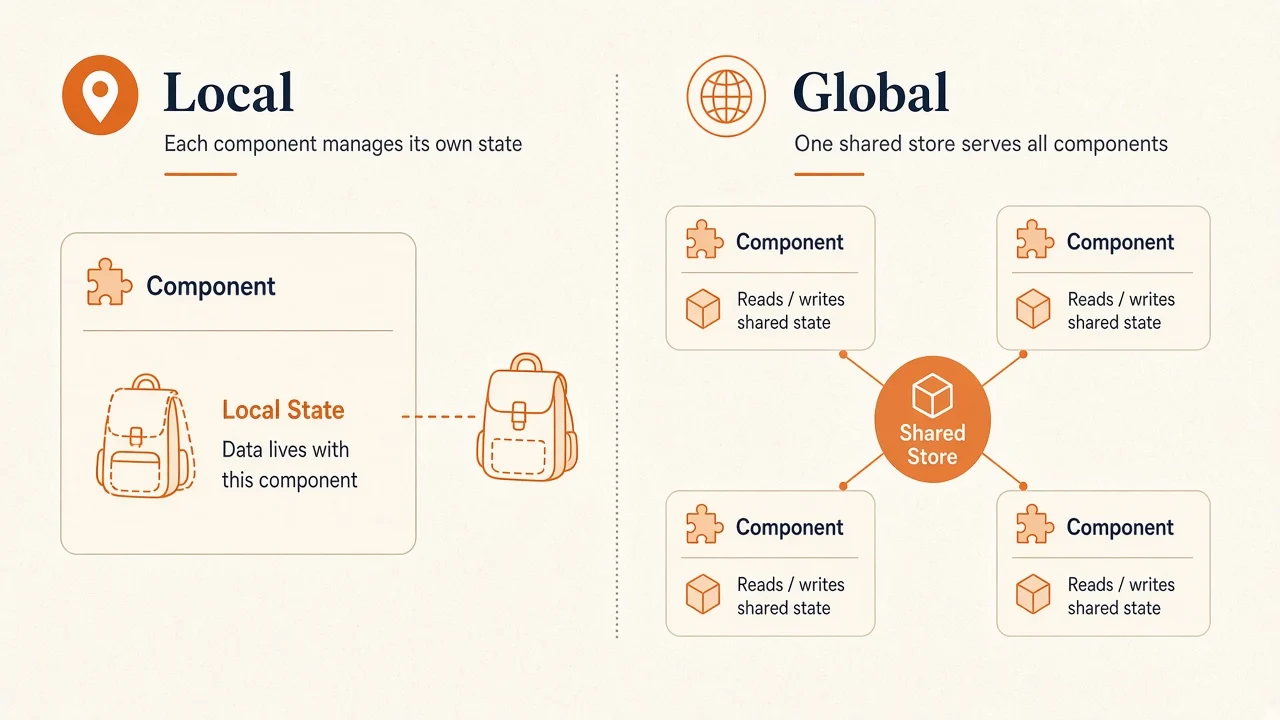
Categorically speaking, ALL state we manage in applications can be written as either "local" or "global" state - a piece of state becomes global based on if its exposed and consumed by the rest of the application (in other components) without passing the data as props. None of the types of state we covered above (1-5) are inherently local or global. For some types, it may seem obvious - a trivial example of this is the UI state - of which you should use React hooks (like useState and useReducer) to manage, almost always. Technically you could configure some UI state to be in a global store such as Redux, but in practice, there's rarely a need for that type of state data to be accessible globally, and configuring it that way will eventually cause performance issues in your application.
To restate our point: you, the developer, must decide what state data should be local vs. global. The trait that defines if a piece of state is local or global is whether the state data is accessed in multiple components without being passed as props.
- If other components (like children) receive state via props, that is local data
- If other components (like siblings or distant relatives) receive the same state data via hooks/functions, that is global data that's been injected/selected into your component
The Focus of this Guide Is Not Routing or Sessions
Now that you know all the types of state, the remainder of this guide will focus heavily on UI State, Communication State, and Application State (1, 2, and 3 above).
Those specific 3 types are the focus because the other types (4. Session State and 5. Location state) can easily be solved for us by tapping into the vast React ecosystem without much consideration. Or, put differently, most apps require the same functionality when it comes to routing and token storage, so there's not much to solve.
It's infrequent that you should write a custom location state manager when plenty of better options already exist for managing navigation history (like react-router-dom (opens in a new tab) or reactnavigation (opens in a new tab) for React-Native apps).
And for session state - there is very little complexity to storing tokens (but some overlap with other session data you can read in the Overlaps section below), so here's a summary:
In almost all React apps that need authentication, the recommendation is to use access tokens for communicating with APIs, and tokens can be stored easily in localStorage to persist across page refreshes. If you are implementing access tokens that can be refreshed (opens in a new tab) (as is common today), your session state management will be a little more hands-on, but typically you can reach for an open-source solution to get you pretty far. In many enterprise apps that use SSO solutions or third-party authentication services, you can use these libraries to manage tokens client-side:
Common Uses of The Tools We Know
There are three primary approaches to managing application state:
- Internal React APIs (
useState,useReducer,useContext) - "Smart" Data-fetching libraries (tanstack-query, rtk-query, swr, etc.)
- Global stores (Redux, Zustand, Jotai, etc.)
Managing state is never as simple as "always use X library for Y requirement". Below are some quick examples of how each approach can manage state in both localish/globalish ways:
- React APIs: can handle local state AND global state
- Ex:
useStatefor a local toggle in a component,useContextfor global dependency injection into components throughout your React tree
- Ex:
- Data-fetching libraries: a blend of local & global state
- Ex: using an API endpoint response in only one component (localish, because that data is only accessed in one container) or re-using the cached response data from that same API endpoint in another component (globalish now, because the data is accessed via a selector, the url, instead of as a prop)
- Global stores: for handling exclusively global state
- Ex: The most common use for global stores are when many components need to access the same information. Even if a global store is used to manage some UI state (which you shouldn't do), that state data would be configured so that its globally accessible in all other components.
Note there is some overlap above - each can solve local/global state to a degree, some just work better for each than others. Again, it is your choice to make your state data hidden in a component (local) or exposed and accessed in other parts of your React tree (global).
However, developers often do reach for global state manager libraries too soon. There is a balance that we need to get right, otherwise we'll end up with bloated applications. Before reaching for a global state, lets cover the ways we can maximize local state in our React app (both for performance and maintainability).
Maximize Local State Best-Practices
Now that you understand the differences between local and global state - you need to understand how far you can take local state before introducing a global store in your application.
- Choosing the State Structure (opens in a new tab) - Advice for how to structure the specific data you will be managing
- Extracting State into a Reducer (opens in a new tab)
- Lifting State (opens in a new tab) - Lifting state to a parent can sometimes alleviate the need for global stores
When Do You Need Global State?
- If you're still prop drilling a lot (after trying the above approaches to lifting state) or feel you're headed in that direction and want to avoid it
- If you have some type of state/store that lives outside of your React application, but you need to consume it in your React app
If you've come this far and now you know you need a global state - the next question is - what are your options? Here are the two popular approaches you can take:
- Data Fetching & Server Cache (tanstack-query, rtk-query, swr)
- Global Stores (Redux, Recoil, etc.)
There are times where you might not need an entire state manager. If your global state is relatively small/simple, you might be fine with one of the following instead:
- URL
- Cookie
- Local/Session Storage
- IndexDB
Why Not Context?
The React docs (opens in a new tab) explain how to use React Context for more global-like state management. While this can be a suitable solution for simple applications, we find that using Context correctly is typically hard to get right as a global state manager, especially if you have lots of data and its frequently being accessed by various trees/nodes in your application.
Our upcoming advanced State Management Guide will explain how to use Context correctly, when it's a good choice, and why we think there are better options (opens in a new tab). The takeaway here is that an efficient (optimized for re-renders) solution for global state management is not an easy task with Context.
1) "Smart" Data Fetching
Before exploring global stores - you should be aware of a common situation in a lot of apps where people *think they need a global store - but don't actually. Picture this React app: a dashboard behind authentication with only several routes (pages). One of the routes simply fetches a dataset from an API and renders a bar graph based on that dataset. Then, a second route also fetches some data from an API, but has a <form /> on the same page that allows the user to update or mutate that data. After the user submits the form, the application should re-fetch the data from the API to have the new data instead of the old stale data the user previously saw.
If you can step back and observe this at a high level… often, this basic CRUD (opens in a new tab) behavior (fetching data, mutating data, then re-fetching data because we know it's stale now) is the majority of an application's state.
The way these data-fetching libraries work to simplify your state manager - is they cache the response of each API endpoint that's getting requests from your app and let you easily re-access the response. The basic idea is when you have multiple components consuming the same endpoint data - the API only gets hit once instead of 3 times (once when each component is rendered) and that response is turned into a global state that gets shared.
The library only needs you to pass the URL string and some options that dictate when the cache should be cleared + refetched. The cache provides you a global store to consume data from in your components, albeit, a pretty simple one that expects all of your data is coming from an API.
TLDR: If most of your app state simply reflects your server state and sharing the server API responses between components, "smart" Data Fetching is probably all you need. Here are some additional things that data-fetching libraries also tend to solve:
- Polling on a time interval
- Revalidation on window focus
- Revalidation on network recovery
- Local mutation (Optimistic UI)
- Smart error retrying
- Pagination and scroll position recovery
This client cache is only one of the layers that can hold old data. The server, the framework and a CDN can cache too; Update Content Without Redeploying walks through each one.
When Data-Fetching Isn't Enough
When you're unsure if smart data-fetching will be enough or if you'll need a "store" of some kind, ask yourself the following questions:
- Will the data in your React app go for extended periods without the need for re-fetching from the API?
- Will the state/data in your React app likely get out-of-sync with the server state, intentional or not, during regular application usage?
- Will your application state be updating data frequently enough that its unreasonable for EVERY change to be persisted to the server immediately when they occur?
- Will your server state update frequently enough that your React app might not know when the cache is stale and data should be re-fetched?
- Is it mission-critical that your application shows the latest (uncached) reflection of server state at all times?
If you answered "Yes" to any of the questions above, you should consider a more centralized global state as a potential solution for more complex requirements.
2) Global Stores | Singleton vs. Atomic vs. Proxy
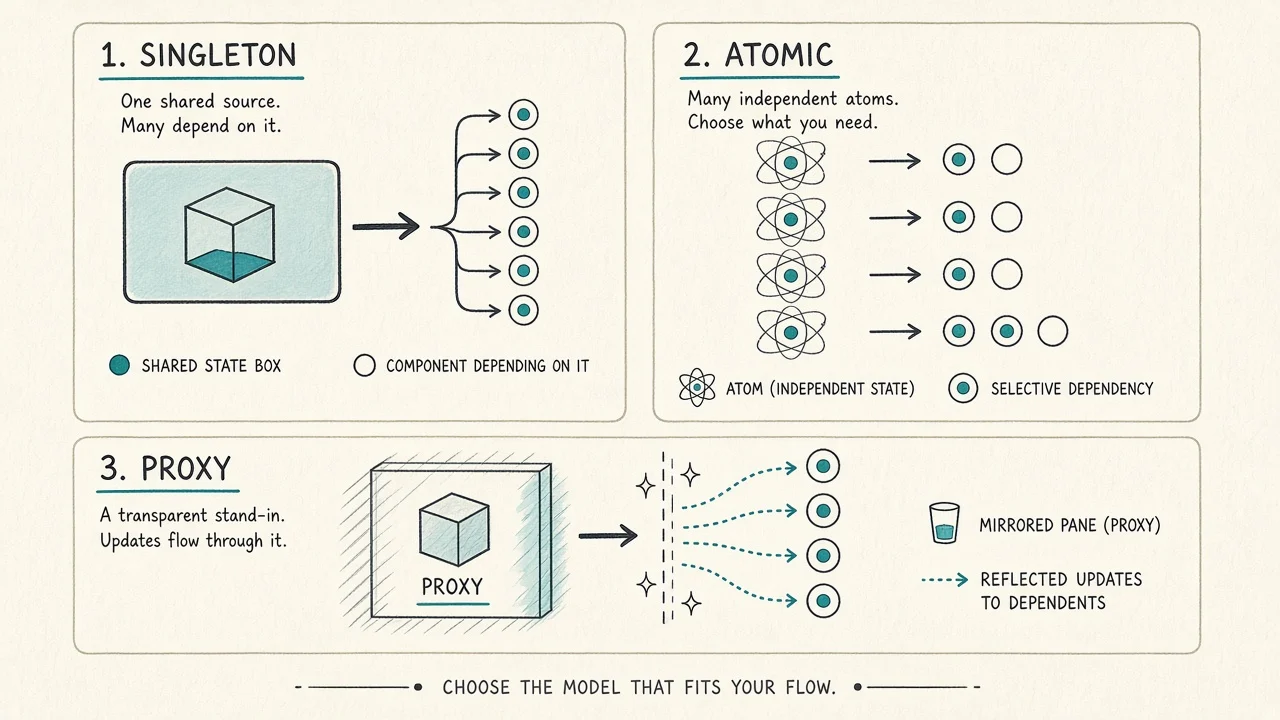
The different recommended approaches for global stores are:
- Singleton - the singleton (AKA "module") architectural approach typically means a single instance of the state (called a "store") that is shared across the entire application. Typically this means one large object that holds ALL state values in your application.
- Atomic - the atomic pattern (often associated with Recoil & Jotai) all centers around the idea of an "atom" - an isolated piece of state. Atoms are consumed & mutated from anywhere in your application. This pattern differs from the singleton approach above by splitting your state into smaller related groups of data that allow more granular interactions with global state data. Atoms can also be grouped together to derive state.
- Proxy - this architecture pattern introduces a proxy object for you to interact with, while that proxy communicates with the source of truth (the store). This approach is intended to make modifying the application state simpler by allowing any assignment/mutation and the proxy forwarding those updates back to the central store (this is the antithesis or opposite of "immutability", really)
Next, you can read more about the tradeoffs and benefits each architecture offers 👇
Benefits
- Consistency: all state updates being made to the same object ensures a consistent single source of truth
- Middleware: side effects (commonly called "middleware") are simple to implement on a centralized store
- Debugging: debugging a timeline of state updates and events is easy when all updates go through the same process
Tradeoffs
- Once your state-update frequency passes a threshold (~hundreds of changes per minute) this pattern might end up costing you performance
- State trees that become very large can lead to performance issues
- Difficulties in code-splitting
Benefits
- Granular Reactivity: since updates can be made to any atom independently, this leads to a very optimized number of re-renders
- Flexibility: atoms allow you to keep your base state as simple as possible and derive any complex state as necessary
- Simplicity: in general, tends to involve less boilerplate/configuration
Tradeoffs
- Experimental: the approach and community is relatively new (compared to others in the ecosystem) - tooling/education might be a little behind that of other architectures
- Lacks "Middleware": The singleton model being so popular for a long time led to the standardization of "middleware" (a big ecosystem benefit)
Benefits
- Granular Reactivity: proxies can allow for very accurate observation of state changes to limit the triggering of re-renders where it's not needed
- Simplicity: state updates are as simple as assignments/mutations to any other variables. Updates get magically "synced".
- DX: there's no new syntax/functions to learn. Simply "import" an value/variable and start consuming it (or mutating it). Updates get synced globally.
Tradeoffs
- Experimental: the approach and community is relatively new (compared to others in the ecosystem) - tooling/education might be a little behind that of other architectures
- Blackbox: the proxy can feel a little magical at times, and may prove difficult to debug in very complex scenarios
- Heavily reliant on browser support for the Proxy (opens in a new tab) API
Table Comparison
The links below take you to bundlejs.com to demonstrate what the bundle size might result in (using latest versions).
| Pattern | Library | Links to Bundle Size | Popularity (weekly downloads) |
|---|---|---|---|
| Flux Module | redux-toolkit (opens in a new tab) | bundlejs.com (opens in a new tab) | 2 million |
| Flux Module | zustand (opens in a new tab) | bundlejs.com (opens in a new tab) | 1.5 million |
| Flux Atomic | recoil (opens in a new tab) | bundlejs.com (opens in a new tab) | 400k |
| Flux Atomic | jotai (opens in a new tab) | bundlejs.com (opens in a new tab) | 450k |
| Proxy | mobx (opens in a new tab) | bundlejs.com (opens in a new tab) | 1 million |
| Proxy | valtio (opens in a new tab) | bundlejs.com (opens in a new tab) | 230k |
Before diving into the recommendations above, it might help to know what "FLUX" means and why it is included in the descriptions of each library.
The FLUX architecture (opens in a new tab) is very intricate with many details, but to sum it up here: unidirectional (one-way) data-flow, implemented with immutability (opens in a new tab).
Whoa, lots of fancy words there. Let's simplify:
unidirectional data-flow- "actions" get "dispatched" to update the "store" in a predictable, consistent manner (opens in a new tab)implemented with immutability- the way that update operations are performed on the store (the literal code that changes the data when an update happens). Read more about immutability (opens in a new tab) and update patterns (opens in a new tab)
FLUX is just a design pattern for updating stores of data, nothing more. You'll notice that nearly every non-proxy library recommended implements FLUX principles in some way - so its important to understand Flux outside the context of any specific one of these libraries.
Common Overlaps Between Different State Managers
As we've just been through many state solutions - undoubtedly there's some "overlap" between what they're able to do. When there's overlap, it can be confusing as to which direction you should take. There are some recommendations below for questions you'll frequently run into while deciding the best ways to manage application state.
The Overlaps Between Each Approach to Global State
- Contexts / Stores share a very similar approach (avoiding prop-drilling to share data), Stores just tend to have more features out of the box and better options for re-render optimizations
- Stores / Data-Fetching Caches also share a similar approach (sharing the same data between components without props / prop-drilling), the data-fetching solutions just assume all/most client state is simply a reflection of the server state (retrievable via API endpoints)
- All 3 solutions (Contexts, Stores, Data-Fetching) consume data from "somewhere else" and use it for things like rendering, mutations/actions, etc.
Specific common overlaps between "App" State and "Session" State
- Keep things like tokens in localStorage, and the actual data those tokens receive in your contexts/stores. The reason is: the token rarely plays a role in the logic/views of your app. It's usually just included in API requests.
- The performant way to store tokens would be to configure your requests globally to use the same API token retrieved from localStorage (just once) instead of constantly retrieving the token from localStorage and then including it in your requests as an HTTP header in each component (this is massive duplication of code and easily avoidable)
- Secondly: should you put "user" info in a store or a context, like a UserContext/AuthContext or something?
- If the auth is handled by the same system/API that you're getting your app data from - just throw it all in the store. Arbitrarily mixing contexts with global stores isn't necessary and would be a confusing division of data
- If the auth is handled by a 3rd party system like Okta, Clerk, OAuth, etc. you could probably just wrap the user/profile info provided back by those parties in a context (since that data will rarely change) and then keep the rest of your business/app data in stores/caches
Thanks / References
Thanks for reading! If you have any suggestions on how developers can approach managing state in their React applications, let's talk (You will get credit for your contributions!).
- kentcdodds.com/blog/application-state-management-with-react (opens in a new tab)
- leerob.io/blog/react-state-management (opens in a new tab)
- matillion.com/resources/blog/react-state-management-libraries-which-one (opens in a new tab)
- dev.to/g_abud/why-i-quit-redux-1knl (opens in a new tab)
Specific thankyou to editors of this guide:
State management checklist
- I can name whether a piece of data is UI, communication, app, session or location state
- New UI state starts local unless sharing is proven
- Server data uses a fetch cache or framework data API when the server is the source of truth
- Tokens are not mixed into hot UI stores without a reason
- Form drafts are not keystroke-updating a global store
- I know why I picked Context, a store or a fetch cache
Further reading
- State Management Anti-Patterns
- Maintainable React Architecture
- Proficiency with Hooks
- Ecosystem
- Stop Unnecessary Re-renders
- Frameworks
- React Fundamentals
Conclusion
Libraries change. The categories of state do not. Decide local versus global, client versus server, then pick a tool that matches the job.
The key takeaway
Maximize local state, put server data in a cache, and add a global store only when sharing is real.
Check your understanding
For a greenfield SPA with unknown scope, what is the best first move?
Pick an answer, or press A, B, C on your keyboard.
Decision framework
| Situation | Prefer |
|---|---|
| Isolated UI chrome | Local useState |
| Low-frequency shared config | Context |
| Complex local transitions | useReducer |
| Remote data with cache/retry | Server-state library |
| Many distant readers, frequent updates | External store |
Also see Where should state live? and Context vs Zustand.
When not to add a library
- Prop drilling through two levels is still fine
- You have not measured a re-render or sharing problem
Checklist
- Separated server state from client state
- Local first, then lift, then Context/store
- No derived state synced only via
useEffect
Recap
What to remember from this article
Sections read
0
Questions
0
none answered yet
Quiz
0
not taken yet
Up next: Where Should State Live? · 2 min
Continue