What you'll learn
- Application code vs content, and why they can ship separately
- When CSR, SSR and SSG read content, and what that means for freshness
- Incremental Static Regeneration: time-based and on-demand revalidation
- Every cache layer that can keep old content alive, including self-hosted setups
- A practical checklist for debugging stale pages
Why Does a Content Update Require a Deployment?
Imagine you are building a blog using Next.js and hosting it on your own server.
You publish a new article or update an existing one. The content is saved successfully, but visitors continue to see the old version of the page. After rebuilding and redeploying the application, the updated content finally appears.
Why did a simple content change require a new deployment?
At first glance, this might seem like a limitation of React or Next.js. However, the real answer lies in how the application generates and serves its pages.
When an application is built, some pages are generated in advance, while others are rendered when a request arrives. Some applications also retrieve content directly from an API or database. Each approach has different implications for how and when changes become visible.
To understand how to update content without redeploying an application, we first need to understand the relationship between application code, content, rendering, and caching.
Application Code vs. Content: What Are We Updating?

Before discussing rendering strategies, we need to distinguish between two things that often change independently.
Application code defines how an application works. It includes React components, business logic, routing, layouts, and functionality.
Content is the information displayed by the application. Examples include blog posts, product descriptions, prices, news articles, and marketing text.
Consider a product page that displays a product name, description, and price.
The React component defines how those values are displayed:
function ProductPage({ product }) {
  return (
    <article>
      <h1>{product.name}</h1>
      <p>{product.description}</p>
      <strong>{product.price}</strong>
    </article>
  )
}
The component is application code. The product information is data.
If we change the component's structure, such as adding a new button or changing the layout, we have changed the application code.
If we change the product description in a database, we have changed the content.
These changes do not necessarily need to follow the same deployment process.
For example, an application can retrieve product information from a database at runtime. When the description changes, the application can display the new value without rebuilding the frontend.
However, if the product page was generated as a static HTML file during the build, changing the database alone will not modify that existing file.
Key takeaway
The key question is not simply whether the content has changed. It is when and where the application reads that content and generates the page.
Checkpoint
Which of these is a content update rather than an application code change?
Pick an answer, or press A, B, C, D on your keyboard.
How Does React Render a Website?
React is a UI library. It allows developers to describe user interfaces using components and update those interfaces when data or state changes.
However, React itself does not dictate how an application must be deployed or where its initial HTML must be generated.
A React application can render its interface in the browser, render HTML on a server, or use a framework that generates pages ahead of time.
Let's explore the main rendering strategies. For the history and trade-offs of each one, see React Rendering Strategies; here we focus on what each strategy means for content freshness.
Client-Side Rendering (CSR)
With client-side rendering, the browser downloads the JavaScript application and executes React to build the user interface.
- 1
Browser requests the page
- 2
Server returns HTML and JS
- 3
Browser runs the JavaScript
- 4
React renders the UI
- 5
App fetches data from an API
Content arrives at runtime
For example:
import { useEffect, useState } from 'react'

function ProductPage() {
  const [product, setProduct] = useState(null)

  useEffect(() => {
    fetch('/api/products/1')
      .then((response) => response.json())
      .then(setProduct)
  }, [])

  if (!product) {
    return <p>Loading product...</p>
  }

  return (
    <article>
      <h1>{product.name}</h1>
      <p>{product.description}</p>
    </article>
  )
}
In this example, the product information is retrieved after the component mounts in the browser.
If the product description changes in the database, a subsequent API request can retrieve the updated value without requiring a new frontend deployment.
There is an important distinction here: the application can still contain static JavaScript and HTML assets, while the data displayed by the application changes independently.
However, this does not guarantee that every visitor immediately sees the latest content. The API, browser, service worker, or another caching layer may return an older response. Client data libraries add a cache of their own too; State Management covers server state, stale times and revalidation on window focus.
CSR is useful for interactive applications, dashboards, and interfaces that depend heavily on client-side data fetching. It can also introduce a loading state and delay the display of data until the browser executes the relevant code.
Server-Side Rendering (SSR)
With server-side rendering, the server generates HTML for a page when a request arrives.
- 1
Browser requests a page
- 2
Server retrieves the data
- 3
React renders HTML on the server
- 4
Server sends the HTML
- 5
Browser displays and hydrates
Interactivity is attached
For example, in a Next.js App Router application:
export default async function ProductPage() {
  const response = await fetch('https://api.example.com/products/1', {
    cache: 'no-store',
  })

  const product = await response.json()

  return (
    <article>
      <h1>{product.name}</h1>
      <p>{product.description}</p>
    </article>
  )
}
Here, cache: "no-store" explicitly requests that this server-side fetch not use the Next.js Data Cache.
When a new request arrives, the server can retrieve the latest product information and generate the page again. If the page needs several requests like this one, start them in parallel instead of one after another; Eliminating Async Waterfalls shows how.
This means the content can change without rebuilding or redeploying the application.
SSR is useful when pages need request-time data, personalized content, or frequently changing information that should be reflected without waiting for a static regeneration interval.
The trade-off is that generating pages on the server requires runtime infrastructure and can add request-time processing costs.
Static Site Generation (SSG)
Static site generation takes a different approach.
Instead of generating HTML for every request, the application generates pages ahead of time, typically during the build.
Consider a blog with 500 articles.
During the build, the application retrieves the article content and generates HTML for each page. The resulting files are then deployed to a web server or CDN.
- 1
Build reads the content
- 2
App generates HTML pages
- 3
Files become deployment artifacts
- 4
Visitors receive those files
No rendering per request
Once generated, a page can be served without running the React application on the server for every request.
This makes static pages fast and relatively inexpensive to serve.
But what happens when an article changes after deployment?
Suppose an article was generated with the following content:
<h1>Understanding React Rendering</h1>
<p>Published in September.</p>
Later, the article is updated to say:
<h1>Understanding React Rendering</h1>
<p>Updated in October.</p>
The source content may now contain the updated text, but the deployed HTML file still contains the previous version.
Why?
Because the build process generated the HTML using the earlier content. Updating the source data does not automatically rewrite the generated file.
Unless another mechanism regenerates or replaces that file, visitors continue to receive the old version.
This is the central issue behind many unnecessary redeployments.
Key takeaway
Static generation is not the problem. The problem is relying on a build-time content snapshot without a mechanism to refresh it.
Checkpoint
An SSG page was built when the article said “Published in September.” The CMS now says “Updated in October.” Where does a visitor's HTML come from?
Pick an answer, or press A, B, C on your keyboard.
SSG is particularly useful for documentation, blogs, landing pages, and other content that can be served efficiently as static files.
The next question is whether we can preserve the benefits of static generation while allowing content to change after deployment.
How Can Static Content Be Updated Without Redeploying?
Static generation and runtime data fetching are not the only options.
We can also use a strategy that keeps pages static most of the time but allows them to be regenerated when necessary.
This is where Incremental Static Regeneration comes in.
Incremental Static Regeneration (ISR)
Incremental Static Regeneration, or ISR, is a Next.js feature that allows eligible statically generated pages to be regenerated after the initial build.
Instead of rebuilding the entire application whenever content changes, Next.js can regenerate relevant pages while the application is running.
For example, consider a blog with 500 articles. Only one article needs an update.
A complete rebuild could regenerate many pages unnecessarily. With ISR, the application can regenerate the affected page without requiring a new deployment.
A simplified example using the Next.js App Router is:
export const revalidate = 60

export default async function BlogPage() {
  const response = await fetch('https://api.example.com/blog', {
    next: { revalidate: 60 },
  })

  const posts = await response.json()

  return (
    <main>
      <h1>Latest Articles</h1>

      {posts.map((post) => (
        <article key={post.id}>
          <h2>{post.title}</h2>
          <p>{post.description}</p>
        </article>
      ))}
    </main>
  )
}
In this example, both the route segment and the data fetch specify a 60-second revalidation interval. The data fetch is explicitly configured for time-based revalidation.
Conceptually, the application can serve generated content and refresh it according to the revalidation policy.
However, a revalidation interval should not be interpreted as a guarantee that every visitor sees an update exactly 60 seconds after it occurs. Revalidation is tied to requests and framework caching behavior, and regeneration can happen after the interval has elapsed rather than at an exact scheduled time.
Predict the output
The page above was generated at 10:00:00 with v1. An editor publishes v2 at 10:00:05. Three visitors arrive. Which version does each one see?
export const revalidate = 60

// 10:00:00  page generated with v1
// 10:00:05  editor publishes v2
// 10:00:30  Visitor A
// 10:01:10  Visitor B
// 10:01:12 Visitor CPick an answer, or press A, B, C, D on your keyboard.
The practical benefit is that the application does not need a complete deployment merely because content has changed.
Time-Based Revalidation vs. On-Demand Revalidation
There are two useful approaches to think about.
Time-based revalidation
The application allows cached data or generated pages to be refreshed according to a configured interval.
This is useful when content changes occasionally and a short delay is acceptable.
For example, a blog that updates a few times per day might not need every page to regenerate immediately.
On-demand revalidation
The application triggers cache invalidation or revalidation when a specific event occurs, such as publishing an article in a content management system.
For example, a CMS can send a webhook to a Next.js application when an editor publishes a new article. The application can then invalidate the relevant path.
A simplified Next.js Route Handler might look like this:
import { revalidatePath } from 'next/cache'

export async function POST(request) {
  // Authenticate the webhook before allowing invalidation.
  const isAuthorized = await verifyWebhook(request)

  if (!isAuthorized) {
    return Response.json({ message: 'Unauthorized' }, { status: 401 })
  }

  revalidatePath('/blog')

  return Response.json({ revalidated: true })
}
Here, verifyWebhook represents application-specific authentication logic that must be implemented.
The example invalidates the /blog path. If individual article pages are cached separately, the application must also invalidate the appropriate article paths or cached data.
The exact behavior depends on the Next.js version, route configuration, and cache strategy.
This approach is useful when content should be refreshed soon after publication without redeploying the application.
If your app uses the Pages Router (this handbook does), time-based ISR is the revalidate field returned from getStaticProps:
// pages/blog/index.jsx
export async function getStaticProps() {
  const posts = await getPosts()

  return { props: { posts }, revalidate: 60 }
}
On-demand revalidation goes through an API route that calls res.revalidate() with the path to regenerate:
// pages/api/revalidate.js
export default async function handler(req, res) {
  if (req.query.secret !== process.env.REVALIDATE_SECRET) {
    return res.status(401).json({ message: 'Invalid token' })
  }

  await res.revalidate('/blog')

  return res.json({ revalidated: true })
}
The rules are the same as in the App Router: regeneration happens on the server, so the app must run as a Next.js server, not a static export.
One important distinction: revalidation is not the same as deploying new code. It updates cached data or generated output according to the framework's rules; it does not replace the application's deployed JavaScript or server code.
Use the simulator below to compare the strategies. Switch on the CDN to see why a successful revalidation can still leave visitors with old content, which is the subject of the next section.
Try it: content freshness simulator
Publish an edit, send visitors, let time pass and see which version each visitor gets.
Cached page, regenerated after 60 seconds. Try: publish, visit, wait 60s, then visit twice.
Clock
10:00:00
Simulated time
Database
v1
Source of truth
Next.js page
v1
Generated at 10:00:00
CDN
off
Requests go to the origin
Event log (newest first)
- Nothing yet. Start with “Publish edit” or “Visit page”.
Understanding Caching: Why Updated Data Can Still Look Old
Even when an application retrieves content dynamically, users may still see outdated information.
To understand why, we need to look beyond rendering.
Caching stores a previously retrieved response or computed result so that it can be reused rather than generated or fetched again.
Caching can exist at several levels:
- Browser cache: The browser may reuse previously downloaded resources or cached responses.
- CDN or reverse-proxy cache: Infrastructure may cache HTML, API responses, or static assets.
- Framework data cache: Next.js may cache the results of eligible data fetches.
- Application cache: The backend may store previously retrieved database records or computed results.
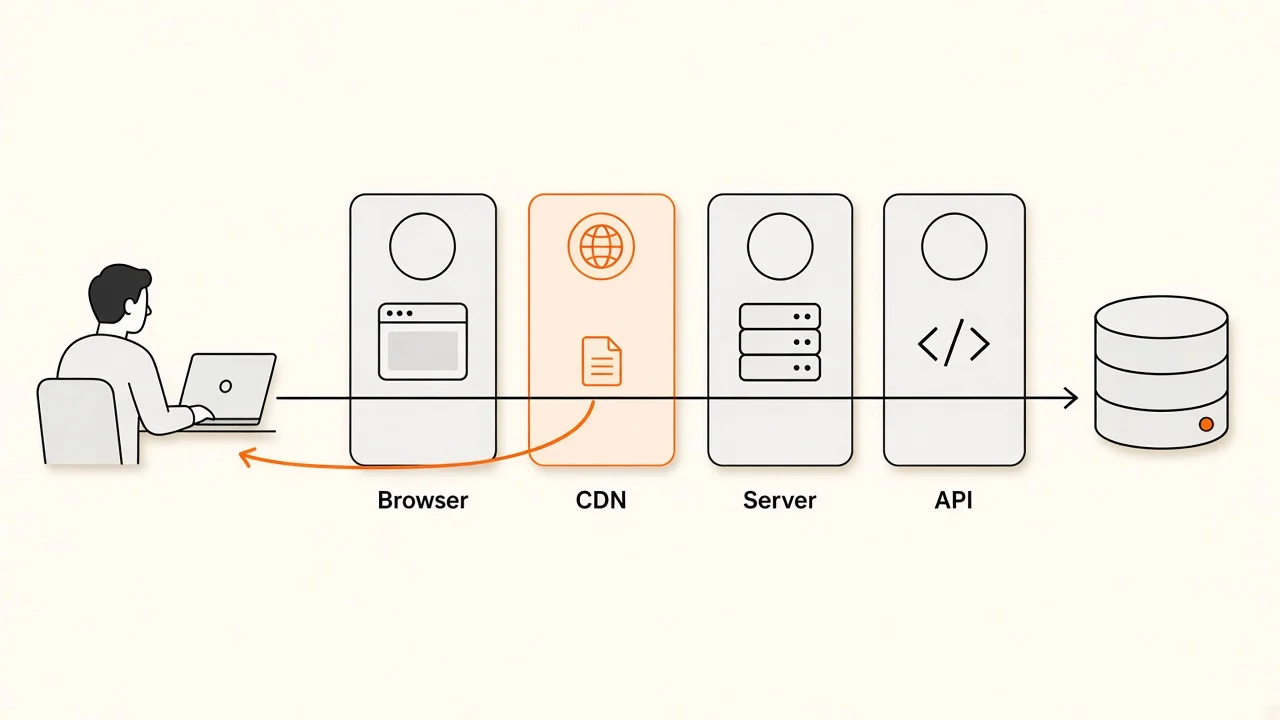
Imagine the product description changes in a database.
The backend database now contains the new value, but the Next.js application may still have cached the old API response. Even if the application requests the product again, it may receive the old value from the cache.
The database is correct, but the content displayed by the website remains outdated.
This is why changing the source of truth is not always enough.
Cache invalidation and revalidation
Cache invalidation means marking cached information as no longer valid, or otherwise removing it so that the application can obtain fresh information.
Revalidation is the process of checking or refreshing cached information according to a defined strategy.
The appropriate solution depends on where the stale data is stored.
For example:
- If the Next.js Data Cache contains outdated data, invalidate or revalidate the relevant data.
- If a statically generated route is outdated, revalidate the relevant page or route.
- If a CDN caches HTML independently, configure the CDN's cache rules or invalidation process.
- If the backend caches database results, refresh the backend cache as needed.
These mechanisms are related, but they are not interchangeable.
Key takeaway
A reliable content-update strategy must account for every cache that can affect the response.
Checkpoint
A publish webhook calls revalidatePath('/blog'). Which of these does it not clear?
Pick an answer, or press A, B, C on your keyboard.
What Changes When You Self-Host a Next.js Application?
So far, we have discussed rendering and caching in general. Now let's consider what happens when you deploy a Next.js application on infrastructure you control.
Self-hosting means running the application on your own server or managed infrastructure rather than relying entirely on a platform that handles the deployment environment for you.
For example, you might build the application, create a Docker image, and deploy it to a virtual machine or container platform.
The important distinction is that self-hosting does not automatically mean that every page is static or that every content change requires a rebuild.
The deployment architecture determines what the application can do. For framework resources beyond this article, see the Next.js page.
Static output
If the application is configured for a static export, Next.js generates files that can be served by a static web server.
This is a simple and efficient deployment model.
However, a static export does not provide a running Next.js server that can perform request-time rendering or the standard server-side ISR workflow. Features that require a server runtime are not available in the same way.
If content changes after the export, you need another mechanism to update the deployed files. That could mean regenerating and publishing the static output or retrieving the changing content separately through a client-side API.
A running Next.js server
If you deploy a normal Next.js application with a supported Node.js server or container runtime, the application can use server-side features such as request-time rendering and supported caching and revalidation strategies.
This allows content to be updated independently of application deployment when the relevant routes and data sources are configured appropriately.
For example, the application can retrieve product information from an external API, render a page on the server, and respond to updated data without rebuilding the application.
Alternatively, it can serve statically generated pages and regenerate them through ISR where supported.
The key difference is that the server continues running after deployment and can perform work that a static web server cannot.
Multiple instances and shared caching
Self-hosting becomes more complicated when an application runs on multiple servers or containers.
Imagine two Next.js instances serving the same website.
If one instance invalidates its local cache after a content update but the other instance still holds an outdated version, users may receive different content depending on which instance handles their request.
The same problem can occur when a load balancer routes requests across multiple instances.
For these deployments, cache coordination matters. Depending on the architecture, the solution may involve a shared cache, a durable cache handler, coordinated invalidation, or infrastructure-specific configuration.
The important point is that supporting revalidation on one server does not automatically guarantee consistent behavior across multiple servers.
Key takeaway
Self-hosting gives you control over the deployment environment, but it also makes you responsible for understanding its runtime, caching, and invalidation behavior.
Which Approach Should You Choose?
There is no single rendering strategy that is best for every application.
The right choice depends on how frequently content changes, how quickly updates must become visible, how much server-side processing is acceptable, and whether the content can be cached.
| Approach | When content is retrieved or generated | Best suited for |
|---|---|---|
| CSR | Data is often retrieved by the browser at runtime | Interactive dashboards and client-driven interfaces |
| SSR | HTML is generated on the server for a request | Request-time or personalized content |
| SSG | HTML is generated ahead of time | Blogs, documentation, and marketing pages |
| ISR | Static output or cached data is refreshed according to a revalidation strategy | Content-heavy websites that benefit from static delivery and periodic or on-demand updates |
These categories are not completely exclusive. Modern Next.js applications can combine them across different routes and components.
Let's look at some practical examples.
Example 1: A documentation website
Documentation pages might change several times a week rather than every few seconds.
Static generation can provide excellent performance. When documentation changes, a deployment pipeline or an appropriate regeneration strategy can publish the updated pages.
If the site uses a supported Next.js server, ISR may allow those pages to be regenerated without redeploying the application.
Example 2: An e-commerce product catalog
Product names, descriptions, and images may change occasionally, while stock levels and prices may need more immediate updates.
You might use static generation or ISR for descriptive content while retrieving frequently changing information through an API.
The important thing is to avoid treating every piece of product data as if it had the same freshness requirements.
Example 3: A real-time dashboard
A dashboard that displays live operational data may need frequent updates.
Client-side polling, subscriptions, or another real-time data-delivery mechanism may be more appropriate than repeatedly regenerating static pages.
SSR can also be useful for the initial response, but it does not by itself keep the page updated after the response has been delivered.
Example 4: A marketing website
A marketing website might contain pages that rarely change.
SSG is often a good fit because pages can be generated ahead of time and served efficiently. Content changes can be published through a rebuild, an appropriate revalidation strategy, or a separate content-fetching mechanism.
A new deployment is not inherently wrong here. If content changes infrequently and the deployment pipeline is reliable, rebuilding may be the simplest and safest solution.
Key takeaway
The goal is not to eliminate deployments entirely. It is to avoid requiring them when a content-only update could be handled by the application's runtime architecture.
Common Misconceptions
"Every content update requires a new deployment."
Not necessarily.
If the application retrieves content from a database or API at runtime, a content update may be visible without changing the deployed application. Static pages need a mechanism for refreshing their generated output, such as regeneration or republishing.
"SSR always gives users the latest data."
Not necessarily.
SSR describes when HTML is generated. Data-fetching caches, backend caches, CDNs, and other infrastructure may still return older content.
Freshness depends on the entire request path.
"ISR updates every page immediately."
No.
ISR supports regeneration and revalidation according to the configured strategy. Time-based revalidation does not guarantee an exact update time, and on-demand revalidation must target the relevant routes or cached data.
"Updating the database automatically updates the website."
Only if the website's delivery strategy allows the change to become visible.
A database update does not automatically rewrite previously generated HTML or invalidate every cache.
"Client-side fetching is always the best solution."
No.
Client-side fetching can make content independent of a frontend deployment, but it introduces considerations such as loading states, error handling, caching, authentication, and search-engine visibility.
Server rendering, static generation, and runtime fetching each have their own trade-offs.
"React is responsible for rebuilding my pages."
React handles UI rendering, but deployment and page-generation behavior depend on the surrounding tooling and architecture.
In a Next.js application, the build process, server runtime, rendering configuration, and caching mechanisms determine how generated pages are updated.
A Practical Checklist for Debugging Stale Content
When users report that a website is showing old content, don't immediately assume that a new deployment is required.
Work through the following questions:
- Where is the source of truth? Is the updated content in a database, CMS, API, or source file?
- When is the content read? During the build, at request time, or in the browser?
- How is the page generated? Is it statically generated, dynamically rendered, or using a combination of strategies?
- Is the data cached? Check the framework's data cache and any application-level caching.
- Is the generated page cached? Inspect route-level behavior, reverse proxies, and CDNs.
- What triggers an update? Is there a scheduled revalidation interval, a webhook, an explicit invalidation call, or a deployment pipeline?
- Does the hosting environment support the required behavior? Verify whether the application runs as a server or as a static export.
- Are there multiple instances? If so, check whether they share consistent caching and invalidation behavior.
Following this process helps identify the actual source of stale content instead of introducing unnecessary rebuilds or changing the rendering strategy without understanding the problem.
Describe your own setup below to get the most likely causes:
Stale content debugger
Describe your setup and see where the old content is most likely coming from.
1.When is the content read?
2.What refreshes the page after an edit?
3.How is the app hosted?
4.Is the server-side fetch cached?
5.Does a CDN or reverse proxy cache the HTML?
6.How many app instances serve traffic?
Likely causes
Answer any question to start.
Conclusion
Updating content without redeploying a website is not a single feature or a framework-specific trick. It is an architectural decision.
The first step is understanding the difference between application code and content. The second is understanding when the application retrieves data and generates HTML. The third is ensuring that caching does not prevent updated information from reaching users.
Static generation can provide excellent performance, but generated files do not automatically change when their source data changes. SSR can generate HTML at request time, but caching can still affect freshness. ISR can refresh eligible static output without requiring a complete deployment, while runtime data fetching can separate changing content from the frontend build entirely.
For self-hosted applications, the runtime environment and caching configuration are equally important. A strategy that works on one server may require additional coordination when deployed across multiple instances.
Code deployments carry a risk of their own: tabs that are already open keep running the previous release. The Hidden Side of Frontend Deployments covers what happens to those users and how to keep them working.
Ultimately, the goal is not to choose the most sophisticated rendering strategy. It is to choose the simplest architecture that satisfies the application's performance, freshness, and operational requirements.
The key takeaway
A deployment updates the application and its deployed artifacts. A content update changes the information the application displays. When the architecture separates these responsibilities, content can change without requiring a new deployment.
Check your understanding
A blog post was generated with SSG. An editor then updates it in the database. Without any other mechanism, what do visitors see?
Pick an answer, or press A, B, C on your keyboard.
Recap
What to remember from this article
Sections read
0
Questions
0
none answered yet
Quiz
0
not taken yet
Up next: Performance & Optimization · 5 min
Continue